


There's a point of view for every Pittsburgh Steelers fan. Perhaps it's a favorite Terrible Towel memory or what you believe the team should do in the draft. When you record it, it's your voice and you. A dark room, however, or a blurry photo provides a way for viewers to focus on something other than the picture. This is a simple method to create your very own clip and polish it up.
Record your own Steelers discussion clearly
Choose a quiet room, with a window or light source so that the light falls on your face and not the back of your head. Place the phone on a firm surface at eye level. Frame yourself from the waist up and move any objects out of the way to the side so that your face can be seen.
Light is free and is the best. A cheap desk lamp with white wall and bounced on to the face beats the ceiling light so many times.
Pick something that you can discuss without reference to a dictionary. A description of something you always do when the team plays a game, the food you eat, the way you do it, the game jersey you always wear, etc. Don't make up a game, a score or a quote. Do the videos yourself! Don't use a clip from a broadcast of an NFL game as test footage. There is no need to spend more than 2-3 minutes on one idea.
Use Vmake to enhance the reaction clip
Upload the clip to Vmake and choose one of the enhancement options in the Video Enhancer, like 4K and cinematic. Let it run and watch the result before you download it.
When you improve video quality on a reaction clip, think about what the viewers stare at: your expression, your team jersey or any other apparel, then the room in front of you. In our instance, the enhanced clip looked clearer and more luminous so it was easier to make out the fan’s face and Steelers jersey.
Don’t hold your breath. It operates on film you've already taken, and a dark or blurry shot might still have to be taken again. Test a 10-second segment first to find out how it deals with your lighting and your jersey.
That ten-second test also saves you from waiting on a long file only to find out the setting wasn't right.
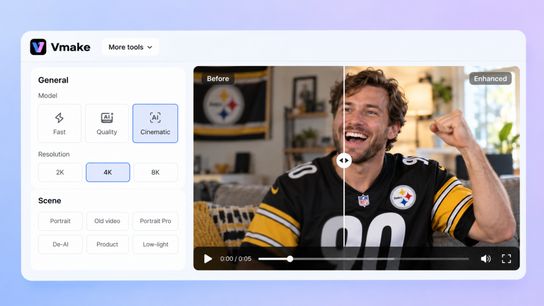
Figure 1: The source clip in the Vmake interface.
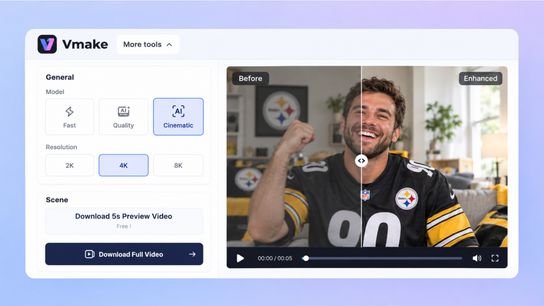
Figure 2: The enhanced result
Keep your appearance natural
Use the same frame for the original and the new clip. Does your face still look like your face? Give the jersey a thorough look. The logo, the numbers and the black and gold should be consistent with the original. The tool is not supposed to change anything if your number is different from the one on your shirt. Then play both and observe the movement of your face when you speak.
When it’s already a bit fuzzy, it’s better to make a video than to try to process the picture.
It first appears on the skin. If your face looks smoother than it would in the mirror, or if your eyes look slightly off… too much, get the original.
Make the reaction easy to follow
Then cut out the dead air and caption in another video editor. Neither is something that Video Enhancer does. Be extra careful when spelling players' and coaches' names and then reviewing the captions with the video to ensure it is at the correct speed. Focus your comments on the main point. People are here to see you.
If you're making a post in a forum or fan group of the Steelers, make it so brief that someone will complete it.
Conclusion
Record your own Steelers reaction, add some enhancements if necessary, make sure you look good and are wearing appropriate gear and post it. The intent is simply a more transparent means of expression, one that's yours in your own voice.